LI PASS Focus Style Settings
Overview
To ensure consistency between LI PASS interface styles and Project in-game interfaces, LI PASS defaults to use the focus (Focus) style of the current configuration of the Unreal Engine engine.If the project side implements a custom focus style, it will be necessary to synchronize the LI PASS focus rendering logic.LI PASS will work together when the scheme is clear.
Current document only applies to the configuration of LI PASS focus style in the Unreal Engine project.
Option Selection
| Scenario | Recommended Solution |
|---|---|
| Project and LI PASS use the same set of focus styles | Solution I |
| The project already has an independent focus style, and only LI PASS needs to display focus | Solution II |
| The project has special focus animation or custom rendering | Contact LI PASS team to evaluate suitability schemes |
Solution I: Use UE Global Focus Style
With the exception of controls that partially support a separate focus style, most UE controls use a global focus style.This style is set using the SetFocusBrush interface.
Prerequisites
In the UE project settings, set Project Settings > User Interface > Render Focus Rule to Always. 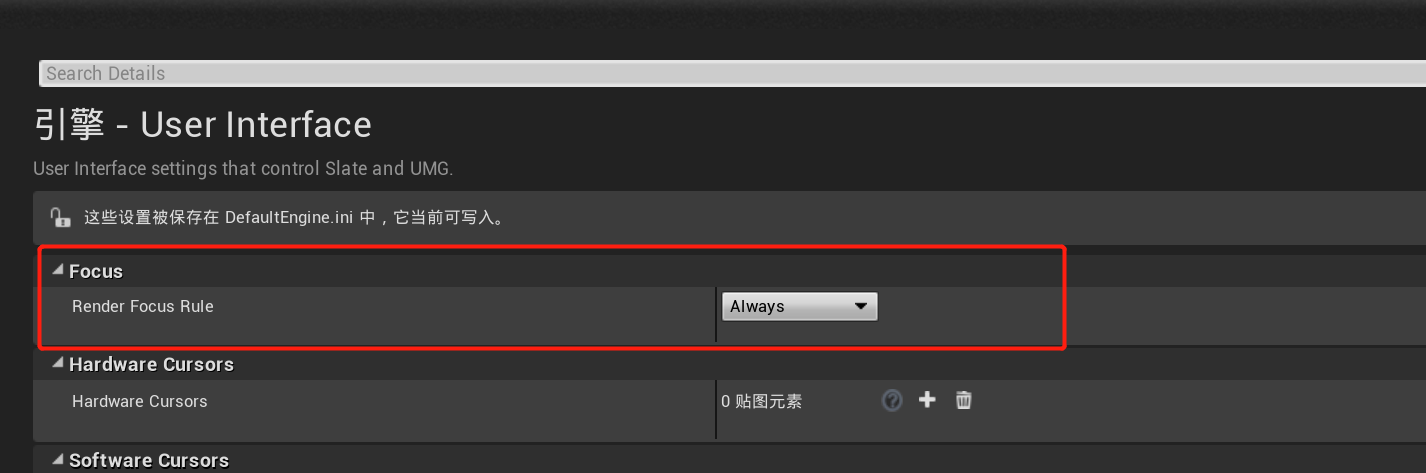
If the project side does not want to modify this setting, please refer to the LIUIRootCanvas scheme for the adjustment.
Add common focus style code
Before initializing LI PASS after program starts, call the SetFocusBrush interface for the corresponding engine version.Businesses can adjust border colors, coarts, and texture effects according to their own project interface style.
Reference code below:
#if ENGINE_MAJOR_VERSION >= 5
#include "Styling/StarshipCoreStyle.h"
#endif
#include "Styling/SlateBrush.h"

// Core code
static FSlateBorderBrush* bursh = nullptr;
if (bursh == nullptr)
{
	bursh = new FSlateBorderBrush("", FMargin(2.0f, 2.0f, 2.0f, 2.0f), FLinearColor::Red);
#if ENGINE_MAJOR_VERSION <= 4
	FCoreStyle::SetFocusBrush(bursh);
#else
	FStarshipCoreStyle::SetFocusBrush(bursh);
#endif
}
How it appears in INTLSample: 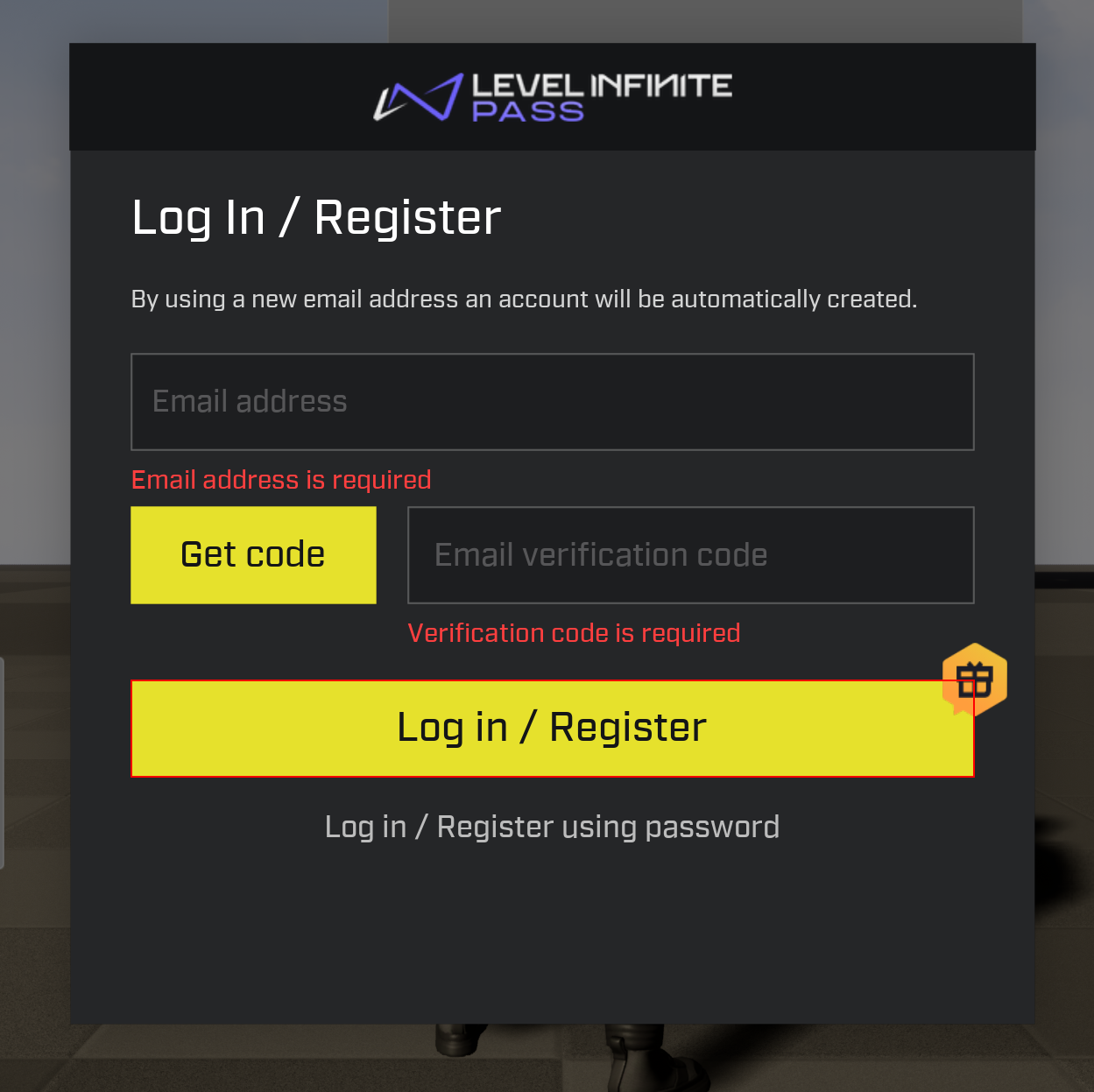
Solution 2: Use LIUIRootCanvas to separately activate LI PASS focus style
If the project already has its own focus display and does not want to modify the global Render Focus Rule, you can enable the common focus style only for LI PASS pages.
Implementation method
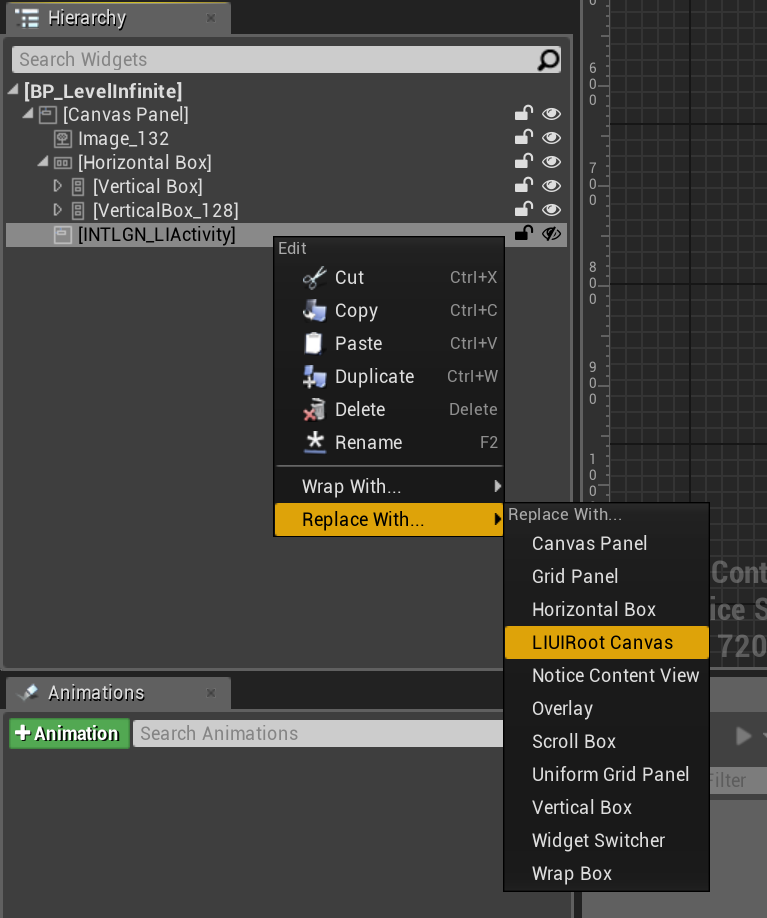
Keep the current Render Focus Rule configuration in the project, and use the LIUIRootCanvas control to replace the UIRoot control type in the LI PASS pages of the project.In this way, only the UIRoot node and its child nodes will display the focus style, not affecting other UI in the project.
Customize the LIUIRootCanvas control
LIUIRootCanvas overrides the OnQueryShowFocus method, which separately enables the rendering of the common focus style for the UIRoot node and its child nodes.
LIUIRootCanvas.h
#pragma once

#include "CoreMinimal.h"
#include "Components/CanvasPanelSlot.h"
#include "Components/CanvasPanel.h"
#include "SLIUIRootCanvas.h"
#include "LIUIRootCanvas.generated.h"

/**
 *
 */
UCLASS()
class INTLSAMPLE_API ULIUIRootCanvas : public UCanvasPanel
{
	GENERATED_BODY()

protected:

	virtual TSharedRef<SWidget> RebuildWidget() override
	{
		MyCanvas = SNew(SLIUIRootCanvas);

		for (UPanelSlot* PanelSlot : Slots)
		{
			if (UCanvasPanelSlot* TypedSlot = Cast<UCanvasPanelSlot>(PanelSlot))
			{
				TypedSlot->Parent = this;
				TypedSlot->BuildSlot(MyCanvas.ToSharedRef());
			}
		}

		return MyCanvas.ToSharedRef();
	};
};
SLIUIRootCanvas.h
#pragma once

#include "CoreMinimal.h"
#include "Widgets/SWidget.h"
#include "Widgets/Layout/SConstraintCanvas.h"
#include "Widgets/DeclarativeSyntaxSupport.h"

/**
 *
 */
class INTLSAMPLE_API SLIUIRootCanvas : public SConstraintCanvas
{
public:
    virtual TOptional<bool> OnQueryShowFocus(const EFocusCause InFocusCause) const
    {
        return true;
    }
};
Required dependent modules:
PublicDependencyModuleNames.AddRange(new string[] { "Core", "CoreUObject", "Engine", "InputCore", "SlateCore", "Slate", "UMG" });
Replace UIRoot control type:
Notes
- SetFocusBrush needs to be called before initializing LI PASS.
- If Render Focus Rule is not set to Always, UE will not display the global Focus Brush by default.
- The LIUIRootCanvas solution only affects LI PASS pages and does not affect other in-game UI.
- If there are custom focus animations or special rendering logic on the game side, please contact the LI PASS team to evaluate and provide a suitable solution.

