TikTok Reward Account Binding
Do not integrate on your own.The TikTok channel requires formal cooperation with TikTok before you can register an application and obtain the configuration required for integration.If you need to integrate, please consult your business contact first.
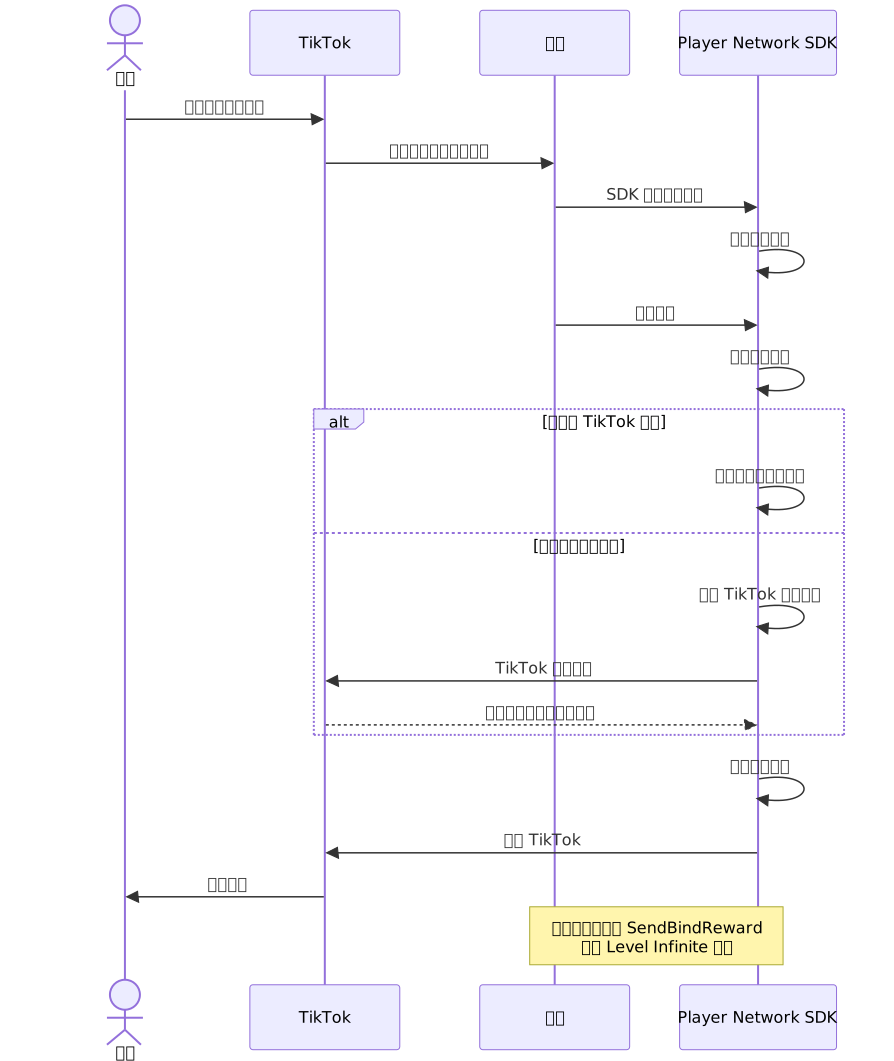
TikTok Reward Account Binding lets players open your game from a TikTok reward campaign, bind their game account to TikTok, and then return to TikTok so the reward can be fulfilled.
Supported platforms
Reward Account Binding is supported on:
- iOS
- Android
Configure the reward bind URI
Open the project INTLConfig.ini file and add the reward bind URI:
[TikTok]
TIKTOK_APP_ID = {INTL_TIKTOK_APP_ID}
TIKTOK_CLIENT_KEY = {INTL_TIKTOK_CLIENT_KEY}
TIKTOK_REDIRECT_URI = {INTL_TIKTOK_REDIRECT_URI}
TIKTOK_REWARD_BIND_URI = {INTL_TIKTOK_REWARD_BIND_URI}
- Replace
{INTL_TIKTOK_REWARD_BIND_URI}with the Reward Bind URI configured in the TikTok developer console.The path must end with/pnt/tiktok/rewardsbind, for examplehttps://example.com/pnt/tiktok/rewardsbind.
On Android, the build pipeline also needs the host and path as manifest placeholders:
android {
    defaultConfig {
        manifestPlaceholders = [
            "TIKTOK_REDIRECT_URI_HOST"      : "{INTL_TIKTOK_REDIRECT_URI_HOST}",
            "TIKTOK_REDIRECT_URI_PATH"      : "{INTL_TIKTOK_REDIRECT_URI_PATH}",
            "TIKTOK_REWARD_BIND_URI_HOST"   : "{INTL_TIKTOK_REWARD_BIND_URI_HOST}",
            "TIKTOK_REWARD_BIND_URI_PATH"   : "{INTL_TIKTOK_REWARD_BIND_URI_PATH}",
        ]
    }
}
- Replace
{INTL_TIKTOK_REWARD_BIND_URI_HOST}and{INTL_TIKTOK_REWARD_BIND_URI_PATH}with the host and path ofTIKTOK_REWARD_BIND_URI.For example, ifTIKTOK_REWARD_BIND_URI = https://example.com/pnt/tiktok/rewardsbind, useexample.comandpnt/tiktok/rewardsbind.
Complete Flow
The following diagram shows the full reward-account-binding flow:
Android deep-link handling
The SDK plugin declares a trampoline activity that catches the reward bind App Link.
Make sure the host app provides INTL_GAME_ACTIVITY_CLASS_NAME metadata so the SDK can return to the correct activity:
<application ...>
    <meta-data
        android:name="INTL_GAME_ACTIVITY_CLASS_NAME"
        android:value="com.yourgame.YourMainActivity" />
</application>
iOS Universal Link handling
On iOS, the reward bind URI uses the same HTTPS scheme and domain as the login redirect URI.iOS routes the callback through Universal Link instead of a custom URL scheme.
Add the reward bind domain to your app's Associated Domains entitlement:
<KEY>com.apple.developer.associated-domains</KEY>
<ARRAY>
    <STRING>applinks:{INTL_TIKTOK_REWARD_BIND_URI_HOST}</STRING>
</ARRAY>
将 {INTL_TIKTOK_REWARD_BIND_URI_HOST} 替换为 TIKTOK_REWARD_BIND_URI 的 host。
Already-logged-in TikTok path
If the player is already logged in through TikTok when the reward link arrives, the SDK skips the bind step entirely and queues a deferred jump back to TikTok.No extra game code is required.
Early termination and loop prevention
The SDK prevents the bind flow from running twice for the same reward link.If a bind is already in progress, duplicate deep-link arrivals are ignored.
The bind flow terminates automatically on any TikTok bind result(success, failure, or cancellation).No game code is required to handle termination.
Return-to-TikTok behavior
Once the bind flow terminates, the SDK automatically opens TikTok and returns the player to the campaign.You do not need to trigger the return manually.This applies to all outcomes — successful bind, failed bind, user cancellation, or the "already logged in with TikTok" fast-path.
Reward (Optional)
TikTok Reward Account Binding only establishes the identity link between the game account and the TikTok account.If your game also uses the Level Infinite reward service to hand out in-game gift packs after the bind, call SendBindReward separately from your game code.This API is independent of the reward-bind return flow and does not affect when the user is sent back to TikTok.
Testing & Troubleshooting
- Confirm that
TIKTOK_REWARD_BIND_URIis set inINTLConfig.iniand matches the value in the TikTok developer console. - On Android, verify that
TIKTOK_REWARD_BIND_URI_HOSTandTIKTOK_REWARD_BIND_URI_PATHare populated as manifest placeholders. - On iOS, verify the Associated Domains entitlement and
apple-app-site-associationfile for the reward bind path. - Confirm that login or auto-login completes after the deep link arrives; the bind flow waits for a successful login event.
- Check native logs for messages from the TikTok reward bind module if the bind does not trigger or the return to TikTok fails.

