iOS
The purpose of this article is to describe how to set up Garena authentication so that your game can be logged in through the Garena channel using the Player Network login authentication service.
Prerequisites
1. Setting up the Garena application
Contact the Garena team to activate the app and obtain an app ID and other relevant information.
To use Garena's platform account bindings, request that Garena enable APP_PLATFORM_BIND.
- Create an account for Player Network Console.
- Create a new project for your game, or join an existing one.
- Download SDK.
- Integrate the SDK.
- Add Garena as an authentication method for your project on Player Network Console.
Step 1:Configure SDK for Garena Login
-
Open the INTLConfig.ini file.
INTLConfig.ini[INTL environment]
# WARNING: You should change this URL to the production environment when you release your game.
INTL_URL = https://intlsdk-new-test.iegg.garena.com
GAME_ID = {INTL_GAME_ID}
SDK_KEY = {INTL_SDK_KEY}
[INTL Log]
LOG_LEVEL = 1
LOG_CONSOLE_OUTPUT_ENABLE = 1
LOG_FILE_OUTPUT_ENABLE = 1
LOG_ENCRYPT_ENABLE = 0
LOG_COMPRESS_ENABLE = 0
[Garena Channel Configurations]
GARENA_APP_SDK_ASSIGN_ID = {INTL_GARENA_APP_SDK_ASSIGN_ID}
GARENA_APP_SDK_KEY = {INTL_APP_KEY}- Set the Player Network SDK authentication domain to
INTL_URL = https://intlsdk-new-test.iegg.garena.comand contact the Garena team for details and an official environment URL. - Replace
{INTL_GAME_ID}and{INTL_SDK_KEY}with theGAME_IDandSDK_KEYassigned by Player Network Console. - Set
LOG_LEVEL = 1,LOG_CONSOLE_OUTPUT_ENABLE = 1,LOG_FILE_OUTPUT_ENABLE = 1,LOG_ENCRYPT_ENABLE = 0andLOG_COMPRESS_ENABLE = 0to output console logs and log files without encrypting or compressing the output without encrypting or compressing the output. - Replace
{INTL_GARENA_APP_SDK_ASSIGN_ID}with the registered Garena App ID. - Replace
{INTL_APP_KEY}with the registered Garena App Key.
- Set the Player Network SDK authentication domain to
-
Add Garena to the
Info.plistfile.
Player Network SDK V1.15 and higher requires the addition of AppTrackingTransparency.framework.It does not need to be added for versions earlier than Player Network SDK V1.15.
Player Network SDK V1.22 updates the version of the Garena SDK, accessing V1.22 also requires adding FacebookClientToken to Info.plist and replacing {INTL_FACEBOOK_CLIENT_TOKEN} with the appropriate value.Also, the Garena SDK introduces the DataDome SDK, which requires adding DataDomeKey and DataDomeProxyEnabled to Info.plist.
Support for iOS Garena Google sub-channel logins is available in Player Network SDK V1.24. Access to V1.24 also requires that you add GIDClientID and custom URLs based on the inverted client IDs to Info.plist and replace {INTL_GOOGLE_CLIENT_KEY_IOS} and {INTL_GOOGLE_REVERSED_CLIENT_ID} with the appropriate values.
See Garena: Upgrade to 4.0.21 for DateDomeKey and DataDomeProxyEnabled configuration.
- Unity
- Unreal Engine
Before exporting your Xcode project from Unity, check the predefined values in INTLGarenaKit.projmods and replace {INTL_FACEBOOK_APP_ID}, {INTL_FACEBOOK_CLIENT_TOKEN}, {INTL_FACEBOOK_APP_NAME}, {INTL_GARENA_APP_SDK_ASSIGN_ID}, {INTL_GOOGLE_CLIENT_KEY_IOS}, and {INTL_GOOGLE_REVERSED_CLIENT_ID} with the appropriate values for your application.
{
"group": "INTL",
"libs": [
    "libz.tbd",
    "libc++.tbd"
],
"frameworks": [
    "Accelerate.framework",
    "Accounts.framework",
    "AdSupport.framework",
    "AuthenticationServices.framework:weak",
    "AVFoundation.framework",
    "CoreGraphics.framework",
    "CoreMedia.framework",
    "CoreServices.framework",
    "CoreTelephony.framework",
    "Foundation.framework",
    "JavaScriptCore.framework",
    "LocalAuthentication.framework",
    "MapKit.framework",
    "MobileCoreServices.framework",
    "Photos.framework",
    "ReplayKit.framework",
    "SafariServices.framework",
    "Security.framework",
    "Social.framework",
    "StoreKit.framework",
    "SystemConfiguration.framework",
    "UIKit.framework",
    "WebKit.framework",
    "AppTrackingTransparency.framework:optional"
],
"embed_binaries": [
    "../../../Plugins/iOS/INTLSDK/INTLGarena/ThirdSDK/DataDomeSDK.framework"
],
"files": [
    "../../../Plugins/iOS/INTLSDK/INTLGarena/ThirdSDK/DataDomeSDK.framework",
    "../../../Plugins/iOS/INTLSDK/INTLGarena/ThirdSDK/AppAuth.framework",
    "../../../Plugins/iOS/INTLSDK/INTLGarena/ThirdSDK/FBAEMKit.framework",
    "../../../Plugins/iOS/INTLSDK/INTLGarena/ThirdSDK/FBSDKCoreKit_Basics.framework",
    "../../../Plugins/iOS/INTLSDK/INTLGarena/ThirdSDK/FBSDKCoreKit.framework",
    "../../../Plugins/iOS/INTLSDK/INTLGarena/ThirdSDK/FBSDKGamingServicesKit.framework",
    "../../../Plugins/iOS/INTLSDK/INTLGarena/ThirdSDK/FBSDKLoginKit.framework",
    "../../../Plugins/iOS/INTLSDK/INTLGarena/ThirdSDK/FBSDKShareKit.framework",
    "../../../Plugins/iOS/INTLSDK/INTLGarena/ThirdSDK/GarenaMSDKDebugSystem.framework",
    "../../../Plugins/iOS/INTLSDK/INTLGarena/ThirdSDK/GarenaMSDKFriends.framework",
    "../../../Plugins/iOS/INTLSDK/INTLGarena/ThirdSDK/GarenaMSDKLoginFacebook.framework",
    "../../../Plugins/iOS/INTLSDK/INTLGarena/ThirdSDK/GarenaMSDKLoginGarena.framework",
    "../../../Plugins/iOS/INTLSDK/INTLGarena/ThirdSDK/GarenaMSDKLoginGoogle.framework",
    "../../../Plugins/iOS/INTLSDK/INTLGarena/ThirdSDK/GarenaMSDKLoginSwift.framework",
    "../../../Plugins/iOS/INTLSDK/INTLGarena/ThirdSDK/GarenaMSDKNotification.framework",
    "../../../Plugins/iOS/INTLSDK/INTLGarena/ThirdSDK/GarenaMSDKParentalControl.framework",
    "../../../Plugins/iOS/INTLSDK/INTLGarena/ThirdSDK/GarenaMSDKPayment.framework",
    "../../../Plugins/iOS/INTLSDK/INTLGarena/ThirdSDK/GarenaMSDKSecurityVerifier.framework",
    "../../../Plugins/iOS/INTLSDK/INTLGarena/ThirdSDK/GarenaMSDKShareFacebook.framework",
    "../../../Plugins/iOS/INTLSDK/INTLGarena/ThirdSDK/GarenaMSDKShareGarena.framework",
    "../../../Plugins/iOS/INTLSDK/INTLGarena/ThirdSDK/GarenaMSDKShareLine.framework",
    "../../../Plugins/iOS/INTLSDK/INTLGarena/ThirdSDK/GarenaMSDKShareSwift.framework",
    "../../../Plugins/iOS/INTLSDK/INTLGarena/ThirdSDK/GarenaMSDKUtilities.framework",
    "../../../Plugins/iOS/INTLSDK/INTLGarena/ThirdSDK/GoogleSignIn.framework",
    "../../../Plugins/iOS/INTLSDK/INTLGarena/ThirdSDK/GTMAppAuth.framework",
    "../../../Plugins/iOS/INTLSDK/INTLGarena/ThirdSDK/GTMSessionFetcher.framework",
    "../../../Plugins/iOS/INTLSDK/INTLGarena/ThirdSDK/Sentry.framework"
],
"folders": ["../../../Plugins/iOS/INTLSDK"],
"excludes": [
    "^.*.meta$",
    "^.*.mdown$",
    "^.*.pdf$"
],
"headerpaths":[],
"build_settings":
{
    "OTHER_LDFLAGS": ["-ObjC"],
    "ENABLE_BITCODE": "FALSE",
    "SWIFT_VERSION":"5.0",
    "LIBRARY_SEARCH_PATHS":["$(SDKROOT)/usr/lib/swift", "$(TOOLCHAIN_DIR)/usr/lib/swift/$(PLATFORM_NAME)", "$(TOOLCHAIN_DIR)/usr/lib/swift-5.0/$(PLATFORM_NAME}"],
    "LD_RUNPATH_SEARCH_PATHS":["/usr/lib/swift", "$(inherited)", "@executable_path/Frameworks"]
},
"system_capabilities": {
    "com.apple.Push":"TRUE"
},
"Info.plist":{
    "LSApplicationQueriesSchemes":
    [
        "fb-messenger-share-api",
        "fbapi",
        "fbauth2",
        "fbshareextension",
        "garenagc",
        "gop{INTL_GARENA_APP_SDK_ASSIGN_ID}",
        "facebook-reels",
        "line",
        "lineauth2"
    ],
    "NSAppTransportSecurity":
    {
        "NSAllowsArbitraryLoads":true
    },
    "CFBundleURLTypes" :
        [
            {
                "CFBundleTypeRole":"Editor",
                "CFBundleURLName":"Garena",
                "CFBundleURLSchemes":["fb{INTL_FACEBOOK_APP_ID}"]
            },
            {
                "CFBundleTypeRole":"Editor",
                "CFBundleURLName":"Garena",
                "CFBundleURLSchemes":["gop{INTL_GARENA_APP_SDK_ASSIGN_ID}"]
            },
            {
                "CFBundleTypeRole":"Editor",
                "CFBundleURLName":"Google",
                "CFBundleURLSchemes":["{INTL_GOOGLE_REVERSED_CLIENT_ID}"]
            }
    ],
    "FacebookAppID":"{INTL_FACEBOOK_APP_ID}",
    "FacebookClientToken":"{INTL_FACEBOOK_CLIENT_TOKEN}",
    "CFBundleName":"{INTL_FACEBOOK_APP_NAME}",
    "GOPAppID":"{INTL_GARENA_APP_SDK_ASSIGN_ID}",
    "DataDomeKey":"DEFAULT_KEY",
    "DataDomeProxyEnabled":false,
    "GIDClientID":{INTL_GOOGLE_CLIENT_KEY_IOS}
}
Add SDK-related configuration to the PLIST file.
- SDK 1.24 and later
- SDK version before 1.24
Modify INTLSDK/Source/INTLConfig/Configs/iOS/Plist/INTLGarena.plist.
<key>LSApplicationQueriesSchemes</key>
<array>
    <string>fb-messenger-share-api</string>
    <string>fbapi</string>
    <string>facebook-reels</string>
    <string>fbauth2</string>
    <string>fbshareextension</string>
    <string>garenagc</string>
    <string>gop{INTL_GARENA_APP_SDK_ASSIGN_ID}</string>
    <string>line</string>
    <string>lineauth2</string>
</array>
<key>NSAppTransportSecurity</key>
<dict>
    <key>NSAllowsArbitraryLoads</key>
    <true/>
</dict>
<key>CFBundleURLTypes</key>
<array>
    <dict>
        <key>CFBundleURLName</key>
        <string>Garena</string>
        <key>CFBundleTypeRole</key>
        <string>Editor</string>
        <key>CFBundleURLSchemes</key>
        <array>
            <string>gop{INTL_GARENA_APP_SDK_ASSIGN_ID}</string>
        </array>
    </dict>
    <dict>
        <key>CFBundleURLName</key>
        <string>Garena</string>
        <key>CFBundleTypeRole</key>
        <string>Editor</string>
        <key>CFBundleURLSchemes</key>
        <array>
            <string>fb{INTL_FACEBOOK_APP_ID}</string>
        </array>
    </dict>
    <dict>
        <key>CFBundleURLName</key>
        <string>Google</string>
        <key>CFBundleTypeRole</key>
        <string>Editor</string>
        <key>CFBundleURLSchemes</key>
        <array>
            <string>{INTL_GOOGLE_REVERSED_CLIENT_ID}</string>
        </array>
    </dict>
</array>
<key>GOPAppID</key>
<string>{INTL_GARENA_APP_SDK_ASSIGN_ID}</string>
<key>FacebookAppID</key>
<string>{INTL_FACEBOOK_APP_ID}</string>
<key>FacebookClientToken</key>
<string>{INTL_FACEBOOK_CLIENT_TOKEN}</string>
<key>CFBundleName</key>
<string>{INTL_FACEBOOK_APP_NAME}</string>
<key>DataDomeKey</key>
<string>DEFAULT_KEY</string>
<key>DataDomeProxyEnabled</key>
<false/>
<key>GIDClientID</key>
<string>{INTL_GOOGLE_CLIENT_KEY_IOS}</string>
<key>LSApplicationQueriesSchemes</key>
<array>
    <string>fb-messenger-share-api</string>
    <string>fbapi</string>
    <string>fb-messenger-api</string>
    <string>fbauth2</string>
    <string>fbshareextension</string>
    <string>garenagc</string>
    <string>gop{INTL_GARENA_APP_SDK_ASSIGN_ID}</string>
</array>
<key>NSAppTransportSecurity</key>
<dict>
    <key>NSAllowsArbitraryLoads</key>
    <true/>
</dict>
<key>CFBundleURLTypes</key>
<array>
<dict>
    <key>CFBundleURLName</key>
    <string>Garena</string>
    <key>CFBundleTypeRole</key>
    <string>Editor</string>
    <key>CFBundleURLSchemes</key>
    <array>
        <string>gop{INTL_GARENA_APP_SDK_ASSIGN_ID}</string>
    </array>
</dict>
<dict>
    <key>CFBundleURLName</key>
    <string>Garena</string>
    <key>CFBundleTypeRole</key>
    <string>Editor</string>
    <key>CFBundleURLSchemes</key>
    <array>
        <string>fb{INTL_FACEBOOK_APP_ID}</string>
    </array>
</dict>
</array>
<key>GOPAppID</key>
<string>{INTL_GARENA_APP_SDK_ASSIGN_ID}</string>
<key>FacebookAppID</key>
<string>{INTL_FACEBOOK_APP_ID}</string>
<key>FacebookClientToken</key>
<string>{INTL_FACEBOOK_CLIENT_TOKEN}</string>
<key>CFBundleName</key>
<string>{INTL_FACEBOOK_APP_NAME}</string>
<key>DataDomeKey</key>
<string>DEFAULT_KEY</string>
<key>DataDomeProxyEnabled</key>
<false/>
-
Add capabilities to Xcode.
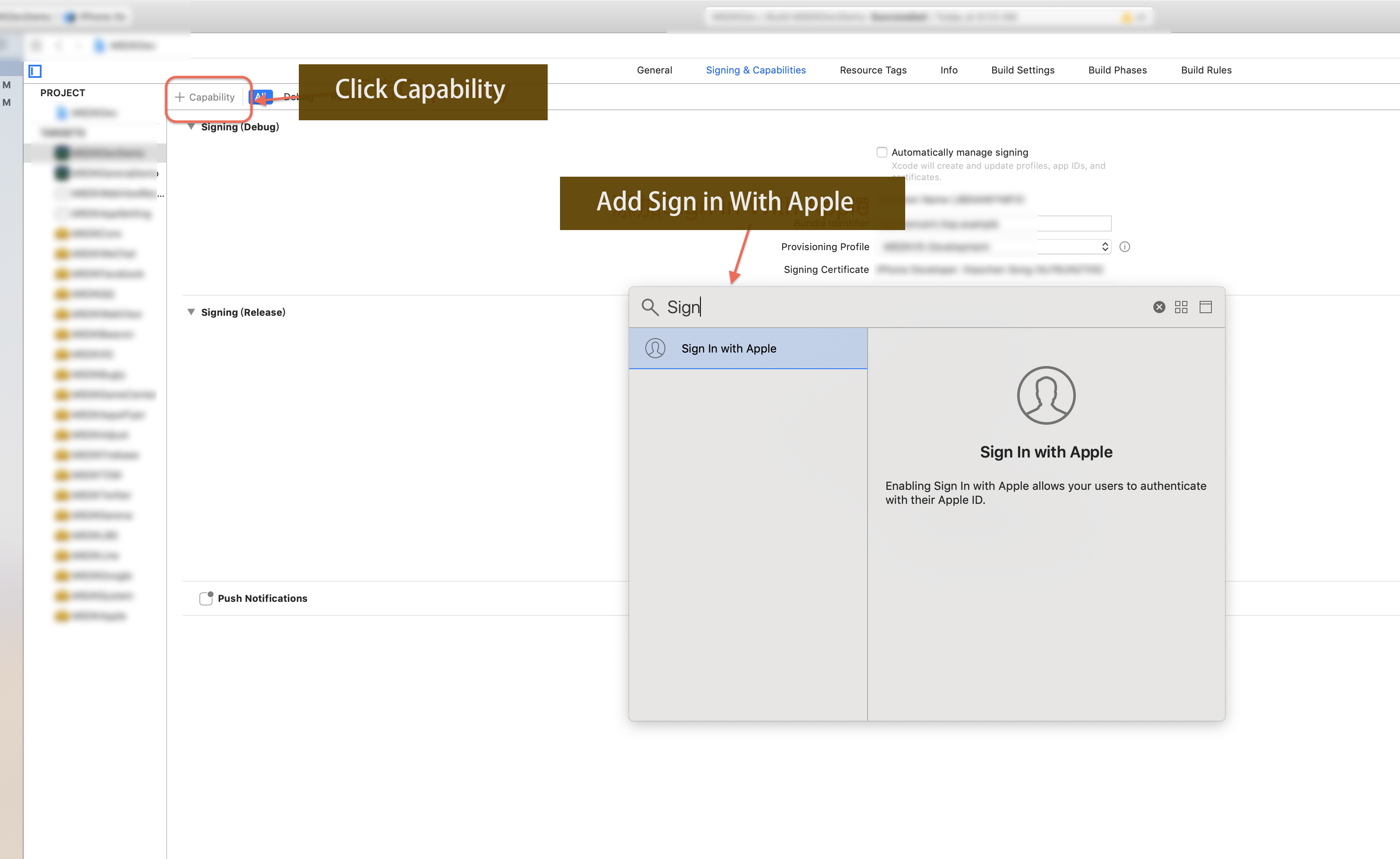
Step 2:Add Garena Login
- Register login-related callbacks.
- Unity
- Unreal Engine
// Add callbacks
public void AddAuthObserver()
{
    INTLAPI.AddAuthResultObserver(OnAuthResultEvent);
}

// Remove callbacks
public void RemoveAuthObserver()
{
    INTLAPI.RemoveAuthResultObserver(OnAuthResultEvent);
}

// Process the INTLAuthResult callback
public void OnAuthResultEvent(INTLAuthResult AuthResult)
{
    Debug.Log($"MethodID: {AuthResult.MethodId}");

    string methodTag = "";
    switch (AuthResult.MethodId)
    {
        case (int)INTLMethodID.INTL_AUTH_LOGIN:
            methodTag = "Login";
            break;
        case (int)INTLMethodID.INTL_AUTH_BIND:
            methodTag = "Bind";
            break;
        case (int)INTLMethodID.INTL_AUTH_AUTOLOGIN:
            methodTag = "AutoLogin";
            break;
        case (int)INTLMethodID.INTL_AUTH_QUERY_USER_INFO:
            methodTag = "QueryUserInfo";
            break;
        case (int)INTLMethodID.INTL_AUTH_GET_AUTH_RESULT:
            methodTag = "GetAuthResult";
            break;
    }
}
C++ Event Handling Method (V1.15 and above)
//configure callback
FINTLAuthEvent authEvent;
authEvent.AddUObject(this, &OnAuthResult_Implementation);
UINTLSDKAPI::SetAuthResultObserver(authEvent);
// Remove callbacks
UINTLSDKAPI::GetAuthResultObserver().Clear();
void OnAuthResult_Implementation(FINTLAuthResult ret)
{
    UE_LOG(LogTemp, Warning, TEXT("MethodID: %d"), ret.MethodId);
}
Unreal event handling method
void OnAuthResult_Implementation(FINTLAuthResult ret)
{
    UE_LOG(LogTemp, Warning, TEXT("MethodID: %d"), ret.MethodId);
}
- Call the
AutoLogininterface to log in automatically.
- Unity
- Unreal Engine
INTLAPI.AutoLogin();
UINTLSDKAPI::AutoLogin();
- Calls the
Logininterface when auto-login fails, causing the player to log in manually.
Currently, the Player Network SDK supports logging into the iOS Garena sub-channels Guest, Garena, Facebook, Apple, and Google.See which sub-channel is currently being used for login by examining the sub-channel name returned in the ExtraJson field of the AuthResult.For example, {"subChannel": "Facebook"}".
Log in to Garena's Facebook subchannel at:
- Unity
- Unreal Engine
INTLAPI.Login(INTLChannel.Garena, "", "{\"subChannel\":\"Facebook\"}");
UINTLSDKAPI::Login(EINTLLoginChannel::kChannelGarena, "", "{\"subChannel\":\"Facebook\"}");
- If the application is installed, open the application login, otherwise open the web login.
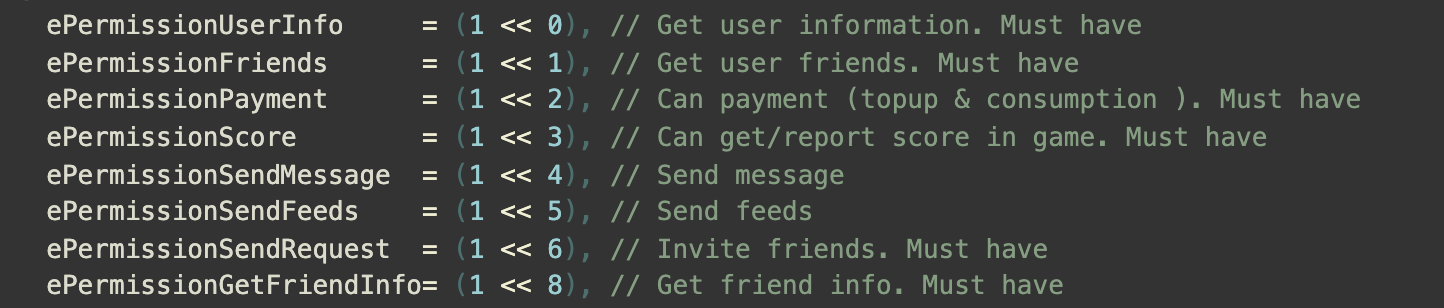
- The Garena login
permissionparameter is different from other channels.The user needs to enter numbers in string format.For example, "2" or "4".Permissions are defined as follows:
- Synchronize client authentication status with the game backend and wait for the final verification result.
Step 3: Acceptance testing for login functionality
Search for the keyword "AuthResult" in the Player Network SDK logs to confirm whether the channel name and OpenID are returned correctly.If correct, it means the integration configuration is successful, and login functionality has been successfully added.
If you encounter issues during the integration process, see FAQs.
Bindings
Due to Garena's restrictions:
- If you have previously used a Facebook login, you cannot use it as a sub-channel for a Garena login.Otherwise, the error code
1013is returned. - Once you have successfully tied up your Garena account, you cannot tie it up again.
When the Bind interface is called, the sub-channel application (or web page) is opened to perform login authentication.After successful authentication, Player Network SDK will bind the sub-channel's account to the visitor's account.
- Unity
- Unreal Engine
// Log in as guest
INTLAPI.Login(INTLChannel.Garena, "", "{\"subChannel\":\"Guest\"}");
// Bind Logic
INTLAPI.Bind(INTLChannel.Garena, "", "{\"subChannel\":\"Facebook\"}");
// Log in as guest
UINTLSDKAPI::Login(EINTLLoginChannel::kChannelGarena, "", "{\"subChannel\":\"Guest\"}");
// Bind Logic
UINTLSDKAPI::Bind(EINTLLoginChannel::kChannelGarena, "", "{\"subChannel\":\"Facebook\"}");
If binding a guest account to Garena fails, the game must invoke Garena's guest login again.
After calling the Bind interface, the Garena SDK session is set to the newly bound channel (with visitor login status), regardless of the binding result.If the Bind interface is called again, the binding will fail due to a session validation failure.Therefore, it is recommended that Visitor Login be called again to return to the normal Visitor Login state.
If you have trouble logging in through Garena, see Garena FAQs.
Unbind Garena Sub Channel
After binding platform accounts, you can use unbindGarenaSubChannel to unbind a specific sub-channel from the current Garena account.
Parameters
| Parameter | Type | Description |
|---|---|---|
| subChannel | string | The sub-channel name to unbind, e.g. "Facebook", "Google", "Apple" |
The result is returned through the ExtendResult callback.
Code Example
- Unity
- Unreal Engine
// invoke function
string paramsJson = "{\"subChannel\":\"Facebook\"}";
INTLAPI.ExtendInvoke(INTLChannel.Garena, "unbindGarenaSubChannel", paramsJson);

public void OnExtendEvent(INTLExtendResult ret)
{
  // callback
  if (ret.Channel.Equals(INTLChannel.Garena) && ret.ExtendMethodName.Equals("unbindGarenaSubChannel"))
  {
      if (ret.RetCode == INTLErrorCode.SUCCESS)
      {
          // Unbind succeeded
      }
  }
}
// invoke function
UINTLSDKAPI::ExtendInvoke(EINTLLoginChannel::kChannelGarena, "unbindGarenaSubChannel", "{\"subChannel\":\"Facebook\"}");

void INTLSDKAPIObserverImpl::OnExtendResult_Implementation(FINTLExtendResult ret)
{
  // callback
  if (ret.ChannelName == kChannelGarena && ret.ExtendMethodName == "unbindGarenaSubChannel")
  {
      if (ret.RetCode == ErrorCode::SUCCESS)
      {
          // Unbind succeeded
      }
  }
}

